

How to Choose the Best UV Small Printer for Your Business?

Choosing the best Uv Small Printers begins with your actual production needs, not attractive specifications. A compact printer may look impressive beside a showroom wall, yet struggle with your daily materials. Consider acrylic panels, coated wood, phone cases, leather, or promotional boards. Each surface reacts differently to ink adhesion, curing, and color density.

Ray Weiss, a recognized digital imaging industry consultant, has emphasized, “The right printer is the one that fits the application, not merely the one with the highest specifications.” That principle deserves attention. Check the printable area, resolution, white-ink performance, curing system, and RIP software. Ask for physical samples using your own materials. A glossy sample from the supplier proves little if your production surface is textured or dusty.

Look closely at workflow details. Can one operator load media safely and align it quickly? Does the machine support variable data, jigs, and repeat orders? Measure ink consumption, maintenance time, ventilation needs, and local technical support. These costs often hide behind the purchase price. They should not.

There is no perfect choice.

A faster printer may demand more maintenance. A cheaper model may create inconsistent white layers. My own caution is simple: do not trust a specification sheet alone. Observe a live demonstration, inspect small text, and test gradients under normal lighting. Your business may outgrow a compact model sooner than expected. Still, selecting a reliable Uv Small Printers system with practical service support can reduce waste, protect delivery schedules, and create sharper opportunities for customized products.
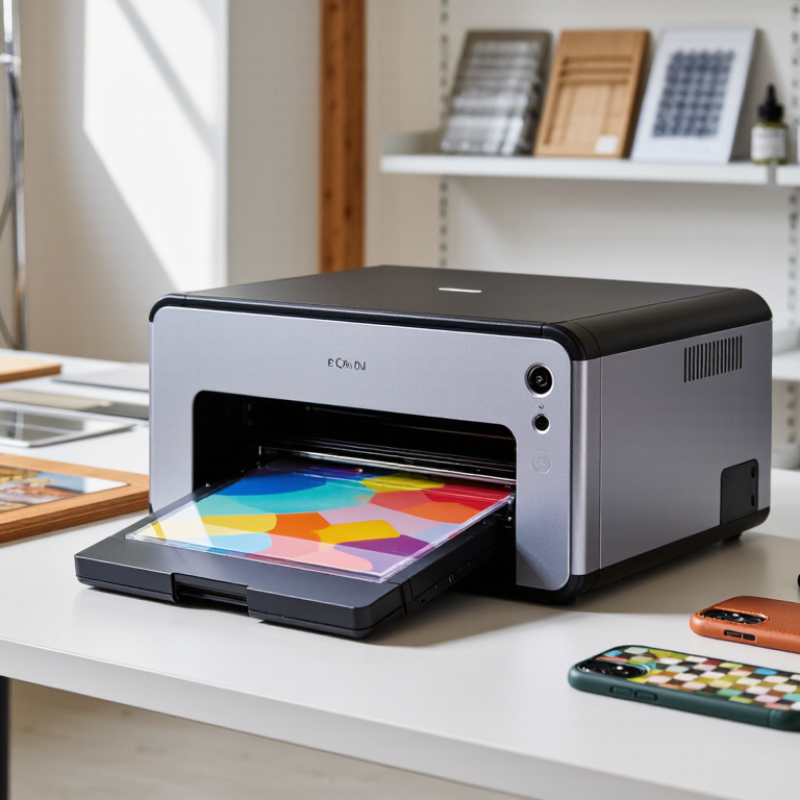
How to Choose the Best UV Small Printer for Your Business?

Understanding UV Small Printers and Their Core Functions

A UV small printer uses ultraviolet light to cure ink immediately after deposition. This creates sharp images on acrylic, wood, metal, glass, leather, and coated plastics. The process is practical for short runs, customized signs, packaging samples, and promotional products. However, “small” describes the footprint, not necessarily the workload.

According to Grand View Research, the global digital printing market was valued at about USD 36.4 billion in 2023. It is expected to expand steadily through 2030. Allied Market Research estimates the UV printing market could reach nearly USD 4.5 billion by 2032. These figures suggest strong demand, but they do not guarantee profit for every small business.

Measure real demand before choosing equipment. A printer with 600 × 600 dpi resolution may suit textured signage, while finer work may require higher resolution and precise droplet control.

Check curing consistency, white-ink circulation, usable print height, and software compatibility. Small details matter.

Test the workflow yourself. Print dark artwork on clear acrylic, then inspect edges under bright light. Review ink consumption, cleaning time, noise, and monthly maintenance.

I once underestimated drying and material setup time; the printer was fast, but the complete job was not. That mistake is worth remembering. Reports show market growth, yet operating costs still depend on labor, substrates, ventilation, rejected prints, and service access. Ask for sample output using your own files, not only showroom images.

Identifying Your Business’s Printing Needs and Materials

Choosing a UV small printer starts with understanding what your business actually produces. I learned this after helping a small gift shop compare printing options. My first estimate was too optimistic. The shop needed sharp graphics on phone cases, acrylic signs, coated wood, and metal tags. Each material reacted differently to UV ink.

List your daily products, sizes, quantities, and surface textures. Measure the largest item carefully. A compact printer may handle flat sheets but struggle with thick objects or uneven edges. Keep physical samples nearby. They reveal problems that product descriptions often hide. Clear acrylic may need pretreatment for stronger adhesion. Rough wood may absorb ink and reduce detail. Test before ordering.

UV printing also depends on workflow, not only print quality. Check loading space, curing performance, white ink capability, and cleaning requirements. Ask for documented test results on your materials. I once focused too heavily on resolution and overlooked maintenance time. That mistake could have reduced production during busy weeks. Consider operator training, ventilation, electrical needs, and local compliance. Reliable technical support matters when an ink layer looks dull or a nozzle starts missing lines. Choose settings that match your real workload, even if they seem less impressive. A slower, consistent printer may serve a growing business better than a faster machine that demands constant adjustment.

How to Choose the Best UV Small Printer for Your Business? — Identifying Your Business’s Printing Needs and Materials

Business Printing Need Recommended Printer Profile Common Materials Typical Printable Area Typical Production Speed Important Technical Features Selection Considerations
Personalized gifts and small products Compact flatbed UV printer with adjustable media height Acrylic, coated wood, glass, metal blanks, leatherette, phone cases A4 to A3 class Approximately 1–5 m²/h White ink, varnish, rotary attachment option, accurate positioning Choose a model that supports uneven objects and provides reliable white-ink circulation for dark or transparent materials.
Short-run signage and promotional products Desktop or small-format flatbed printer with multi-layer printing PVC board, acrylic sheet, foam board, aluminum composite panel, corrugated plastic A3 to approximately 600 × 900 mm Approximately 3–10 m²/h CMYK plus white ink, optional clear varnish, multi-pass print modes Prioritize media thickness, print-bed stability, and the ability to print white beneath color or as a spot layer.
Custom labels, packaging, and prototypes Small flatbed printer with high-detail and repeat-position capability Paperboard, coated paper, synthetic paper, films, folding carton samples A3 to approximately 600 × 900 mm Approximately 2–8 m²/h Fine-resolution mode, registration guides, low-heat LED curing, varnish effects Check adhesion on the exact packaging stock and confirm that the software supports variable artwork and repeat jobs.
Interior décor and personalized panels Medium-format UV flatbed printer with extended media-height range Wood, glass, ceramic tile, decorative board, metal sheet, rigid plastics Approximately 600 × 900 mm to 900 × 1200 mm Approximately 5–15 m²/h Strong vacuum bed, height sensing, white and clear ink, durable curing system Evaluate maximum substrate thickness, surface preparation requirements, and long-term scratch and chemical resistance.
Textured graphics and premium visual effects UV printer supporting clear ink, layered printing, or tactile effects Art board, coated panels, acrylic, wood, metal, decorative laminates A3 to approximately 900 × 1200 mm Approximately 1–6 m²/h in effect-printing modes Clear varnish, variable ink height, raised-texture capability, accurate layer control Effect modes normally reduce output speed; compare visual quality, layer thickness, and ink consumption before purchase.
Retail samples and on-demand customization Compact printer designed for quick job changeovers and simple operation Small rigid blanks, promotional merchandise, coated wood, acrylic, metal tags A4 to A3 class Approximately 1–4 m²/h Simple RIP workflow, automatic height detection, fast curing, easy media alignment Focus on setup time, operator training, maintenance access, and consistent color between small batches.
Transparent and dark substrates UV printer with dependable white-ink management and layered-color control Clear acrylic, transparent film, dark plastics, colored metal, tinted glass A4 to approximately 600 × 900 mm Approximately 1–6 m²/h White-under-color mode, white-over-color mode, ink agitation or circulation, opacity controls Confirm white-ink storage, circulation, nozzle-maintenance procedures, and the recommended idle-time routine.
High-detail promotional and decorative work UV printer with fine-droplet control and high-resolution print modes Coated plastics, acrylic, aluminum, glass, polished wood, specialty boards A3 to approximately 600 × 900 mm Approximately 1–5 m²/h in high-quality modes High-resolution imaging, precise carriage movement, color calibration, fine-pass printing Use higher-quality modes for small text and detailed artwork, but allow for longer production times and higher ink usage.

Note: Speed ranges are general operating estimates for small UV flatbed printers and vary according to print mode, image coverage, number of passes, substrate preparation, and ink-layer configuration. Always test the actual materials used in your business before making a purchase.

Comparing Key Features, Print Quality, and Production Capacity

How to Choose the Best UV Small Printer for Your Business?

A suitable UV small printer should match real production demands, not impressive showroom figures. Grand View Research estimates that the global UV printing market will grow at about 10% annually through 2030. This growth reflects demand for short runs, customization, and fast delivery. Still, market growth does not guarantee a suitable machine. Check maximum print width, media thickness, white-ink circulation, curing stability, and software compatibility. These features directly affect daily workflow.

Print quality depends on more than advertised resolution. Ask for samples using your actual materials, including coated boards, acrylic, wood, and textured surfaces. Examine tiny text, solid color areas, gradients, and edge sharpness under normal lighting. The ISO 12647 family of standards emphasizes process control and repeatable color conditions, which are more useful than a single DPI number. A spectrophotometer, stable ink delivery, and adjustable curing power can improve consistency. They also add maintenance work.

Production capacity requires honest calculations. Compare rated speed with usable output after cleaning, loading, alignment, curing, and reprints. Smithers’ digital print research continues to identify short-run flexibility as a major growth driver, but flexibility can reduce throughput. Speed is not everything. A machine rated at 8 square meters per hour may produce far less during mixed jobs. Measure setup time, average uptime, operator workload, and monthly service response. I would test a full shift before purchasing. One overlooked weakness may be noisy operation, awkward maintenance access, or slow white-ink recovery. Test before buying.

Evaluating Ink Types, Operating Costs, and Maintenance Requirements

Choosing a UV small printer starts with the ink, not the advertised resolution. In daily production, ink chemistry affects adhesion, color stability, odor, and curing behavior. Rigid UV ink suits coated boards, acrylic, glass, and other hard surfaces. Flexible ink is safer for films or materials that bend. Some applications need a primer. That extra step adds labor and drying time. I once focused too heavily on print speed and underestimated surface preparation. The result looked sharp, but adhesion failed after repeated handling.

Operating cost includes more than ink per square meter. Track ink usage, primer, cleaning fluid, electricity, rejected pieces, and labor. White ink often consumes more because it needs regular circulation and heavier coverage. Estimate costs from real test files, not a supplier’s simplest sample. Measure setup time, average run length, and monthly maintenance hours. A small printer can be economical for short personalized orders. It may become inefficient when frequent color changes create waste. Keep a simple spreadsheet. Imperfect estimates are still better than guesses.

Maintenance requirements should match your staff and schedule. Daily nozzle checks, wiping, and surface cleaning prevent small defects from becoming costly reprints. Inspect the capping station, wiper, and UV lamp at recommended intervals. Poor ventilation can affect comfort and equipment reliability, even when odor seems mild. Ask for documented procedures, service response times, and spare-part availability. Do not assume an easy interface means easy maintenance. Leave space around the machine for access. A neglected cleaning routine can erase the savings from cheaper ink.

Selecting a Reliable UV Small Printer for Long-Term Business Growth

Choosing a UV small printer for long-term growth requires more than comparing purchase prices. The machine must match your materials, workload, staff skills, and available workspace. Measure sample products first. Print on coated acrylic, wood, metal, and textured stock if those materials matter to your business. Check color consistency, fine text, curing strength, and surface adhesion after handling. A sharp sample can still fail after a week of regular use.

Reliable equipment should offer stable printhead performance, predictable UV curing, and accessible maintenance procedures. Ask for documented output tests rather than attractive demonstrations alone. Request files showing nozzle checks, ink usage, cleaning schedules, and recommended operating conditions. These details reveal whether the printer supports repeatable production or only occasional display pieces. Consider service response times, spare-part availability, software compatibility, and operator training before signing an order. The cheapest option may become expensive when small delays stop a whole day’s work.

Calculate the cost per finished item, including ink, electricity, cleaning fluid, waste, labor, and rejected prints. That calculation is imperfect, but it exposes weak assumptions. Leave room for growth. A printer that handles today’s orders may struggle when custom batches double during seasonal demand. Still, buying excessive capacity too early can burden cash flow and complicate training. Choose a reliable workflow, not merely a compact machine with impressive specifications. Keep maintenance logs and review real production results each month. Small corrections made early often protect long-term business stability.

How to Choose the Best UV Small Printer for Your Business?

A reliable UV small printer should be evaluated by more than purchase price. The chart presents a practical weighted decision model based on the key factors that affect print quality, operating costs, productivity, and long-term business growth.

Use these percentages as a planning benchmark and adjust them according to your products, production volume, materials, maintenance capability, and local service availability. The model does not represent data from any specific company or brand.

Choose a global leader for your hydraulics solutions

How can we help you?

Call to 0034 943884600 Contact us
Call us Contact us

We use cookies to ensure that we give you the best experience on our website. If you continue without changing your settings, we'll assume that you agree to receive cookies on the HINE website. For more information read our cookie policy page, click the link for more information.plugin cookies

ACEPTAR
Aviso de cookies